FAQ
Q: What does the prices range for a custom PNGtuber look like?
A: EliealisArts’ Custom PNGtuber models start at $160 at this time. With add-ons, the price will vary, but that’s fully up to you to decide if you want add-ons. EliealisArt will never “add on” anything without discussing it with you first.
Q: How many commissions does EliealisArt take at a time?
A: When I open my commissions, it’s first-come, first-served. I will only take 3 commissions when I open them. 1 will be my current project, and the other 2 will be put on my accepted commissions waiting list. I only feel comfortable taking on 3 at a time at this time, as I want to avoid burnout as much as possible. Once I’ve completed those 3 commissions, I will take a break for a week or two. Then will post a date on my socials when my commission slots will open up again.
Q: What is PNGtuber+?
A: PNGtuber+ is the program I use to rig and run my PNGtuber models. It is the only program I will use for rigging commissions at this time. If you want to commission me to make you a PNGtuber but don’t want to use PNGTuber+, then you can just commission me to draw you a PNGtuber.
Q: Where do I get PNGtuber+ from?
A: You can download PNGtuber+ for free from Steam, just search PNGtuber+ in Steam store, or go to https://kaiakairos.itch.io/pngtuber-plus to download it for free from itch.io!
Q: How do I upload my PNGtuber into PNGtuber+?
A: Once you have PNGtuber+ running in the editor menu, click the little pencil icon down in the bottom right, and it’ll bring you a screen with a grey background. Here, hit your escape key. It’ll open up PNGtuber+’s folder. Drag and drop your PNGtuber.save file into this file. Do not put it in logs or shader_cache. Close out of the folder and then look up to the top left corner where 6 buttons are. Click the icon with the little guy poping out of the folder that says Laod avatar when you hover over it. A new menu will open, and you should see your .save file there. Click on it to load it in, and you’re done! If you have any troubles feel free to message EliealisArt, and they should be able to help you if you can’t figure it out.
Q: How many toggles can I have?
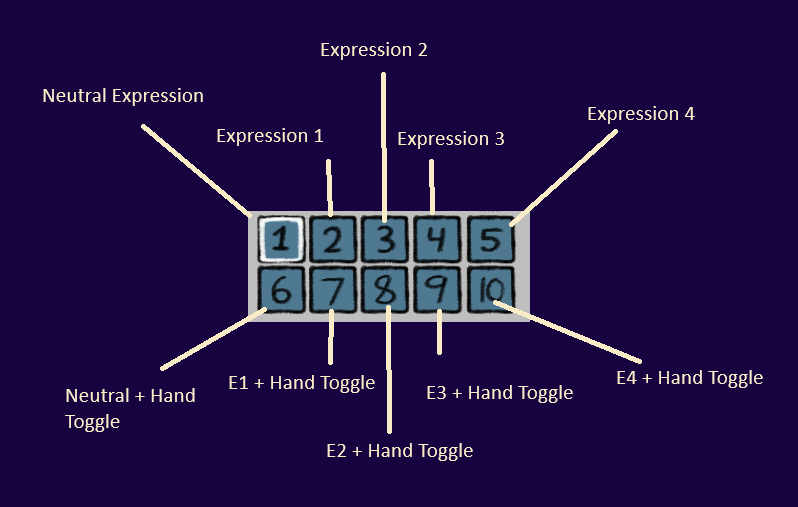
A: If you are having me rig your PNGtuber, I rig it in PNGtuber+, which unfortunately only has 10 toggle slots at this time. My personal recommendation is to have 5 expression slots, one being your neutral toggle, with the other 5 slots being each expression plus your hand toggle of choice. This is what my base PNGtuber pack has. If you want to hand toggles instead of none and one, then you can have that as an add-on.
Q: How does EliealisArt take payments?
A:
Starting Payment: Once they are ready to work on your PNGtuber, they will send you an invoice to your email through Squarespace. Once you pay it and the invoice goes through, EliealisArt will start working on your commission.
Completed Payment: Once EliealisArt has completed your commission, they’ll send you a link through email or Discord that sends you to a personalized store with your PNGtuber commission listing. Buy your model from your shop, and you’ll immediately have access to your model download!
Q: What is the difference between the commission acceptance waiting list and the accepted commissions waiting list?
A:
Commission Acceptance Waiting List: The list for those waiting for a commission slot to open up. It’s a high-priority list/if you submitted a request during the current commission intake period, but EliealisArt ran out of commission spots and would like to take on your commission in the future, they will ask if you’re okay with being put on this list.
Accepted Commissions Waiting List: The waiting list for commissions that EliealisArt has accepted to take on, and the commissioner has agreed to EliealisArt’s contract.